Add the resource language and field to use in a multilingual report.
Add Resource Language
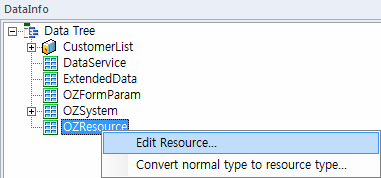
Click the [Edit Resource] pop-up menu of OZResource from the DataInfo window.
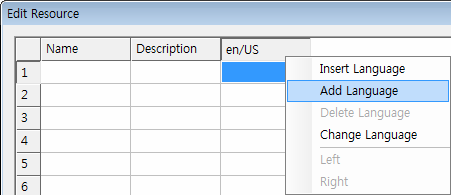
Click the [Add Language] pop-up menu of the language column from the edit resource dialog box.
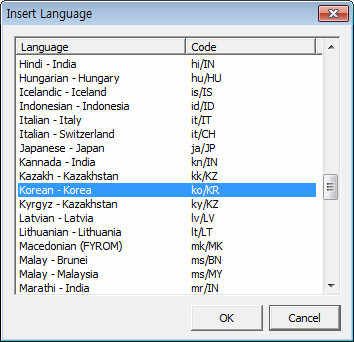
The resource language is added after selecting a language to add and clicking the [OK] button.
Add Resource Field
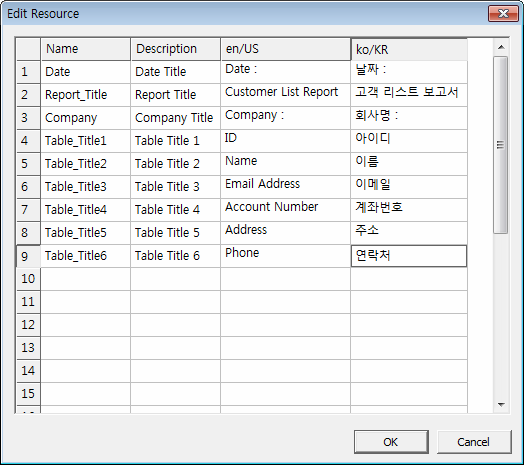
Click the [OK] button after inputting field values in the Edit Resource dialog box.
The added resource field is displayed in the DataInfo window as a list type.
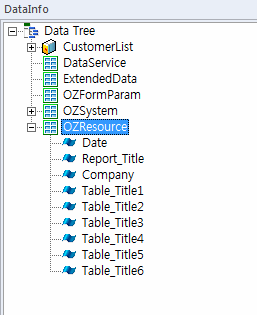
If you select a resource field, the name, value and description of field are displayed in the properties window.
Field value displayed is the field value of the report designer language and if the language of the report designer does not exist in the resource language, the field value of the first one from the resource language is displayed.
|
Usage of the Edit Resource dialog box: Insert/Add Language : To insert/add a resource language, click the [Insert Language]/[Add Language] pop-up menu in the language column. Delete Language : To delete a language, click the [Delete Language] pop-up menu in the language column. Change Language : To change a language, select another language from the [Change Language] pop-up menu and click [OK]. Change the order of priority : Resource language is applied in the order of priority displayed in the edit resource dialog box. If you want to change the order of priority, click the [Left]/[Right] pop-up menu in the language column. Insert/Add Field : To insert/add a resource field, click the [Insert Resource]/[Add Resource] pop-up menu in the field row. Delete Resource : To delete a resource field, click the [Delete Resource] pop-up menu in the field row. Change the order of field : To change the order of a field, click the [Move to Top]/[Move to Bottom]/[Move Up]/[Move Down] pop-up menu in the field row. |
